Schema
Schema helps you generate JSON Schema from real documents, edit the contract, and validate target JSON against it. The workspace is built around JSON Schema Draft 4.
Shared JSON without a contract drifts. Designers add fields, services rename keys, and samples quietly diverge from what code expects. Schema gives you an editable contract and a validation loop that stays inside Unity.
Open Schema
Left rail → Schema, or JEditor → Go to Schema
Schema uses schema tabs. Empty tabs offer:
- Create from Document
- Open Schema
Matching File menu actions: New Schema Tab, Open Schema, Create From Document…, Validate.
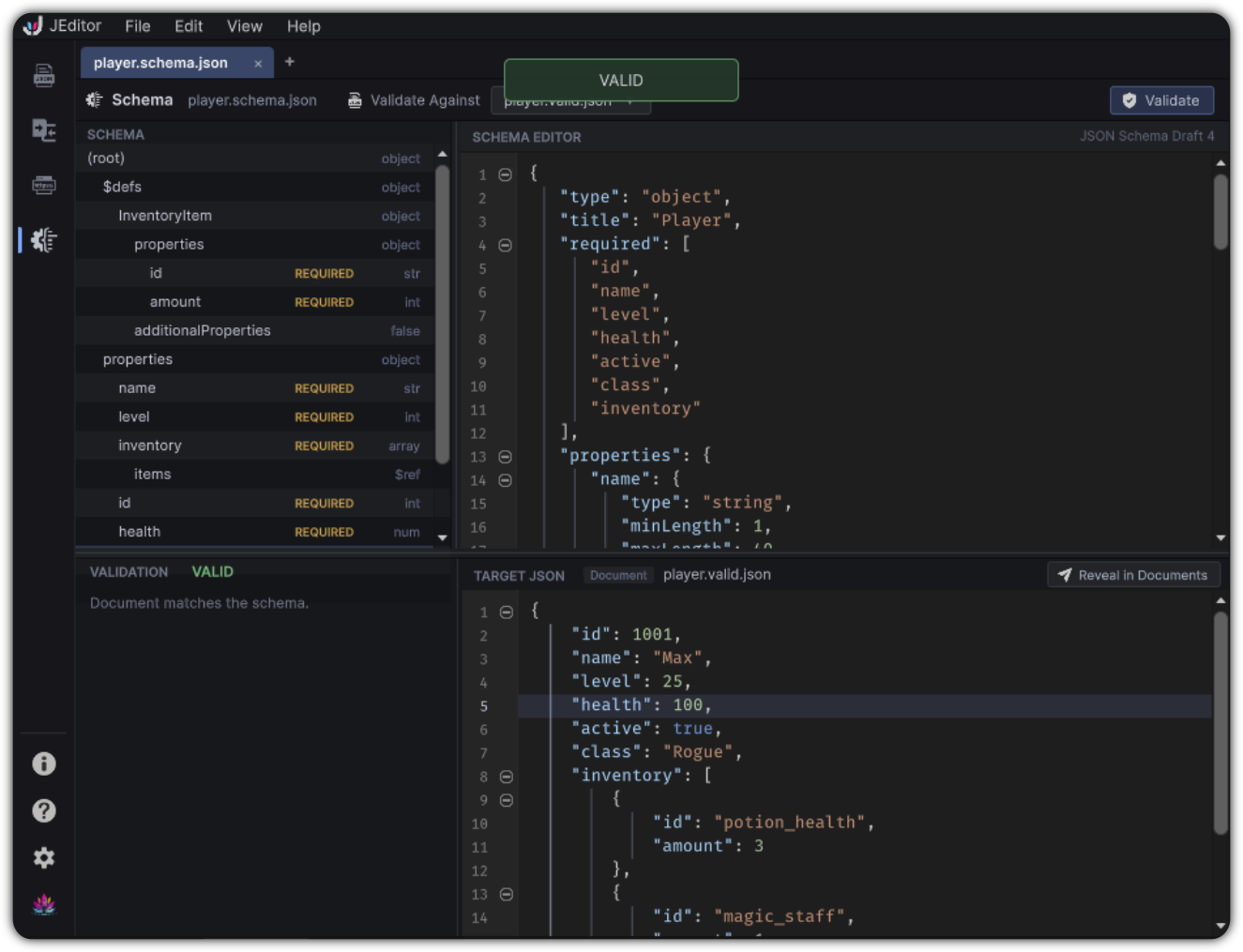
Workspace layout
Toolbar: schema name · Validate Against · Validate

 SCHEMA nav tree     SCHEMA EDITOR (Draft 4 badge)
 ─────────────────   ─────────────────────────────
 VALIDATION          TARGET JSON
| Region | Role |
|---|---|
| SCHEMA nav tree | Structural map of the schema with context actions |
| SCHEMA EDITOR | Text editor for the schema document |
| VALIDATION | Last validation status and issue list |
| TARGET JSON | The JSON being validated, with reveal support |
Generate a schema
Create Schema From Document / Create From Document… opens a modal:
- Choose a source document
- Optional title
- Toggle Mark present properties as required
- Confirm
JEditor generates a schema document, binds the session, and sets the validation target to the source document so you can validate immediately.
Generation defaults are also controlled in Preferences → Schema.
Validate against a target
- Choose Validate Against
- Pick a current Documents entry, or Load JSON File…
- Confirm (optionally Add to Documents)
- Click Validate
Results appear as toasts and in the VALIDATION panel:
- VALID
- SCHEMA INVALID
- Error count with issue rows
Click an issue to reveal it in TARGET JSON. If the target is a Documents entry, Reveal in Documents switches back to the Documents workspace.
Validation becomes stale when schema or target content changes after the last run until you validate again.
Edit with the nav tree
The schema tree follows the contract: properties, definitions, and array items.
Context actions can include:
- Edit Rule
- Reveal in Editor
- Set type / required
- Rename, duplicate, remove
- Add property / constraints
- Copy JSON path
Preferences can enable:
- Auto-reveal selection in the schema editor
- Double-click to edit rule
- REQUIRED badges
- Dialect badge display
- Optional delete confirmation
Practical loop
- Open a representative content document in Documents
- Switch to Schema → Create from Document
- Tighten required fields and types in the tree / editor
- Point Validate Against at other content files
- Fix either content or contract until validation is clean
Example source:
Generated schema becomes the contract for every later itemId payload you validate in the same workspace.
Limits
- Validation and generation are Draft 4 oriented
- Targets that are not added to Documents can still be edited in the target panel as an in-memory buffer
- Invalid schema JSON disables useful navigation until repaired