HTTP
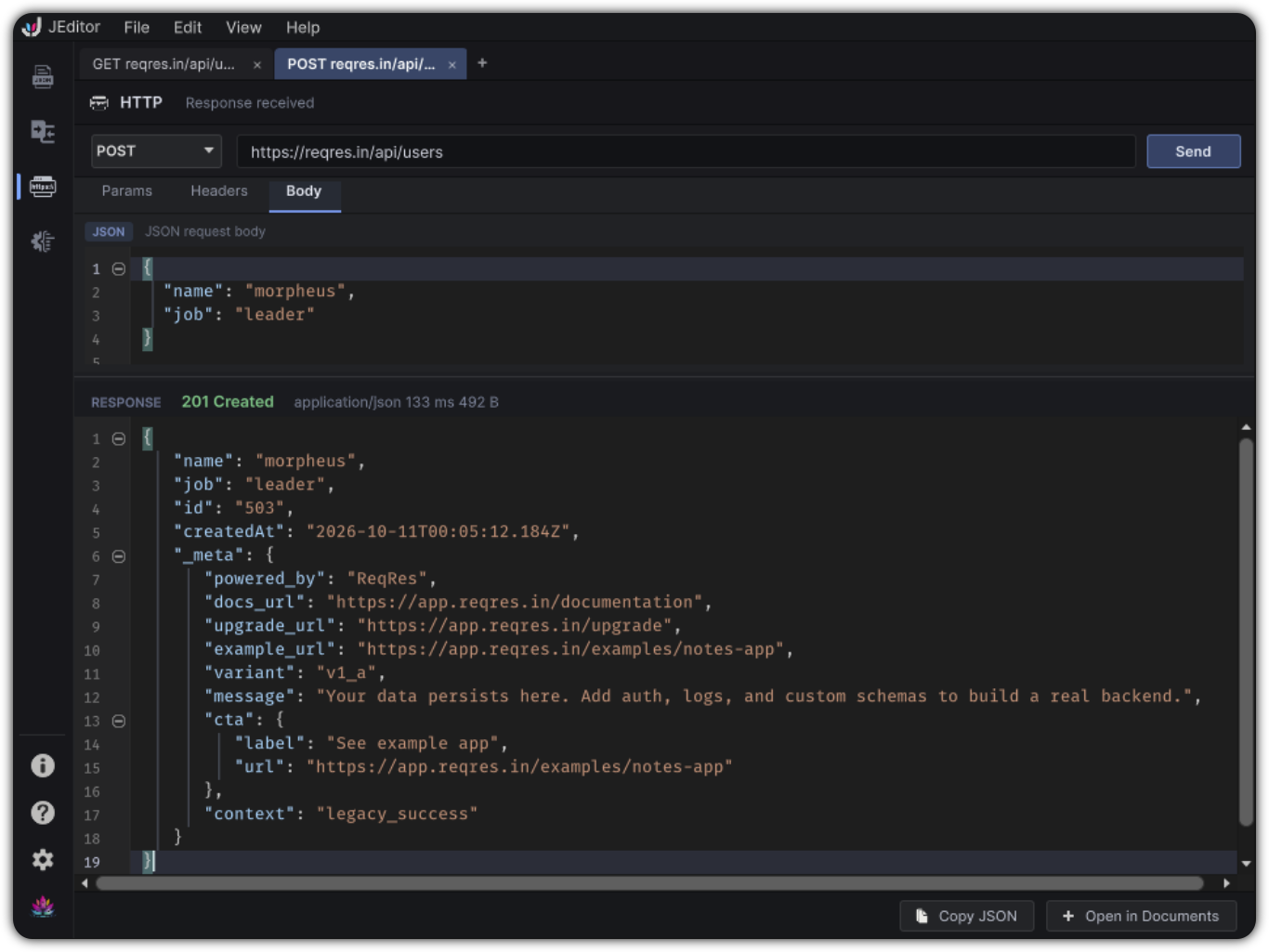
HTTP is a focused request workspace for fetching JSON into your Unity editing loop. Author a request, inspect the response, then open it as a Document when you want the full JEditor toolset.
Live ops endpoints, debug servers, and local tooling often speak JSON. Copying responses through a browser or external client breaks focus. HTTP keeps a lightweight request surface next to Documents, Compare, and Schema.
It is intentionally compact: methods, URL, params, headers, JSON body, and response inspection. It is not a full API platform with environments or auth suites.
Open HTTP
Left rail → HTTP, or JEditor → Go to HTTP
HTTP uses request tabs. Create tabs with File → New Request.
Anatomy
Method ▾   URL field                         [ Send ] [ Cancel ]
status line

 Params | Headers | Body(JSON)

 RESPONSE
 status · content-type · duration · size
 read-only JSON editor
 [ Copy JSON ] [ Open in Documents ]
Request controls
| Piece | Details |
|---|---|
| Method | GET, POST, PUT, PATCH, DELETE, HEAD, OPTIONS |
| URL | Absolute http / https URL; Enter in the field can send |
| Params | Enabled key / value pairs merged into the query string |
| Headers | Enabled key / value pairs; sensitive values can be masked in the UI |
| Body | JSON editor enabled for POST / PUT / PATCH |
| Timeout | Per-request timeout (bounded range; default 30 seconds) |
Invalid JSON bodies block send with a toast. If a body is present and no Content-Type header is set, JEditor defaults to application/json.
Only one request is in flight at a time for the service instance. Cancel aborts it.
Response
The response section shows:
- HTTP status and styling for success / transport / cancel / HTTP error cases
- Meta such as content-type, duration, and size
- A read-only JSON editor (formatted when the payload looks like JSON)
| Action | Result |
|---|---|
| Copy JSON | Clipboard copy of the response body |
| Open in Documents | Creates or focuses a linked document such as response_<host>.json |
Once a response is in Documents, you can Tree-edit, Search, validate with Schema, diff with Compare, or generate Live C#.
Workflow
- New request tab
- Choose method and paste the URL
- Add query Params / Headers as needed
- For write methods, author a JSON Body
- Send
- Open in Documents when you want deeper tools
Example body for a local debug endpoint:
Limits
- Absolute http / https URLs only
- Unity may ignore some restricted headers
- No built-in OAuth / environment variable suites in the current product
- Closing behavior keeps you from ending with zero tabs in normal use